Do the math where you cut the steel.
Sections, weights and cutting plans free on your iPhone, no account. DXF, quote requests and more with Pro.
Coming soon to the App Store
- iPhone
- Metric and imperial
- EU and US sections
Sound familiar?
Every day, time and steel are lost to math on the back of an envelope. This is what MasMetal fixes.
-
Guessing the weight
- HEA 200 · 2 × 4.2 m
42.3 × 8.4 = 365?- + flat + tube … ??
With MasMetal471.9 kg
total, per section to the standard
The calculation list gives the weight per section and the total, per the standard, as you type.
Read the guide → -
Ordering too many bars
- 4200 + 4200 = 8400
fits on 6 m?- how many bars to order??
With MasMetal30 m
to order · 8.5 m left, drawn per bar
The cutting plan spreads your pieces over 6 or 12 m bars and tells you exactly what to order and what is left.
Read the guide → -
Offcuts nobody can find
- SHS 80 offcut · ±2.5 m?
at the back, I think- just order new then
With MasMetal2580 mm
rack A, outside left · used first
Offcuts keeps track of what is on the rack and where. The cutting plan uses them first.
Read the guide → -
Angles worked out on scrap paper
- 120° frame … saw at ?
60° or 30°??- cut piece 2 again
With MasMetal30° + 23.1 mm
saw setting per piece, with the extra length
Mitre, Spacing and Pipe joint do the math. For a pipe you print the template at full size.
Read the guide → -
Half a day chasing prices
- call Steel supplier A
retype the list for B- C speaks German??
With MasMetal3 emails
ready, each in the supplier's language
Quote request writes a prefilled email per supplier, in their language, with every line, the total weight and a request for price, lead time and payment terms.
Read the guide → -
No drawing for the laser
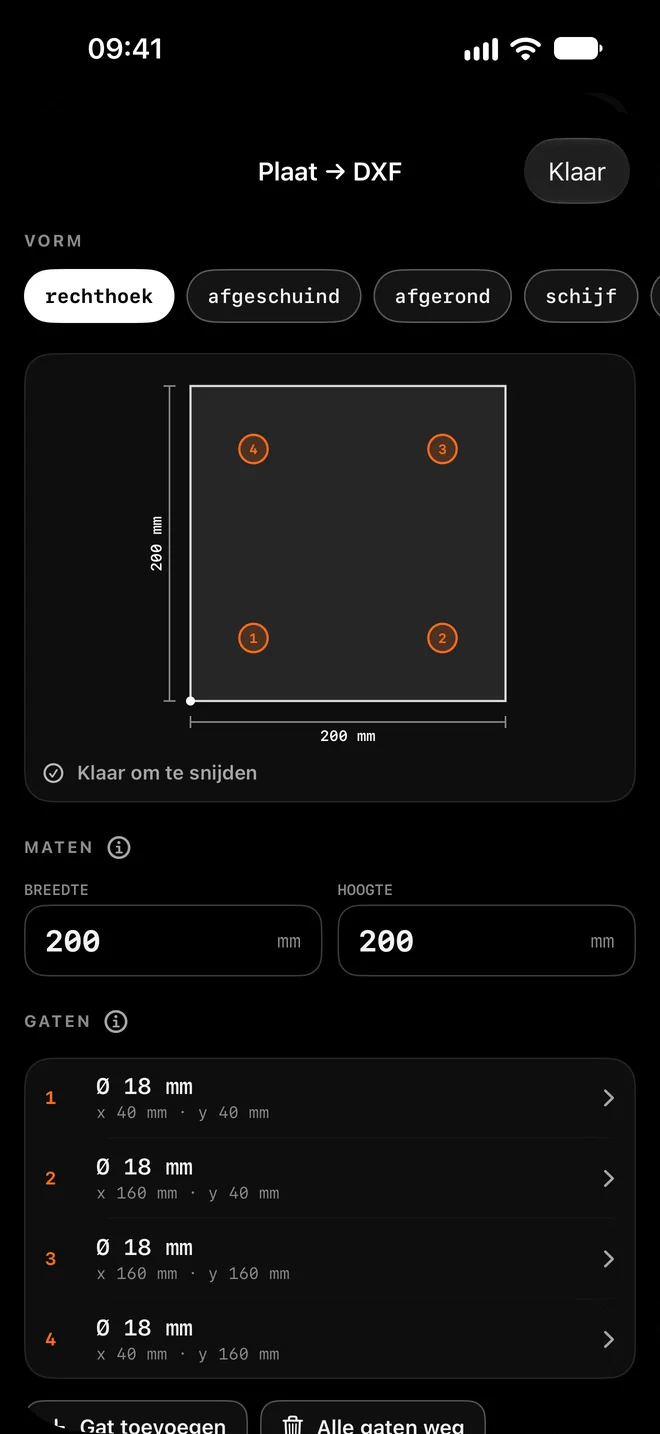
- base plate 200 × 200
- 4 holes Ø18 at 40 mm
no CAD, no time
With MasMetalbase-plate.dxf
cutting file ready for the laser
With Plate → DXF and Scriber you make the cutting file on your iPhone, in a few taps.
Read the guide →
Tools
The everyday calculators are free. Those marked PRO are part of Pro. All guides →
-
Sections W shapes, channels, HSS, pipe, angle and flat bar.
Depth, width, thickness, weight per foot or metre, moment of inertia and section modulus. European and American series, in rotatable 3D. Read the guide →
-
Calculation list Weight and totals per project.
Section, length, quantity and steel grade. Totals update live, so you know the weight before the crane shows up. Read the guide →
-
Cutting plan Stock lengths with as little waste as possible.
Spread your cut list over 6 or 12 m (20 or 40 ft) bars. Each bar shows what you cut and what is left. Read the guide →
-
Mitre Saw angle from the frame angle. PRO
A flat corner, a bend in a slope or a true compound angle, with the length correction for the outside dimension. Read the guide →
-
Spacing Balusters spaced evenly across an opening. PRO
Enter the opening and the baluster, and get the gap and the layout marks. Made for railings and gates. Read the guide →
-
Pipe joint Fishmouth for pipe on pipe. PRO
A wrap-around template for the branch pipe, plus the hole template for the main pipe. From 20° to square, offset too. Read the guide →
-
Offcuts Know what is still on the rack.
You can keep track of leftovers from a cutting plan, with their spot on the rack. The app tells you when you already have a piece. Read the guide →
-
Sheet metal bending Developed length and bend deduction. PRO
For the press brake, calibrated to your own machine, with the full working shown. Read the guide →
-
Quote request By email to your suppliers, in their language. PRO
From calculation list to a prefilled email per supplier, in their language. Share the cut list as a PDF. Every request gets its own reference. Read the guide →
See it on screen
Real screens from the app on an iPhone. Shown in the Dutch version.
-
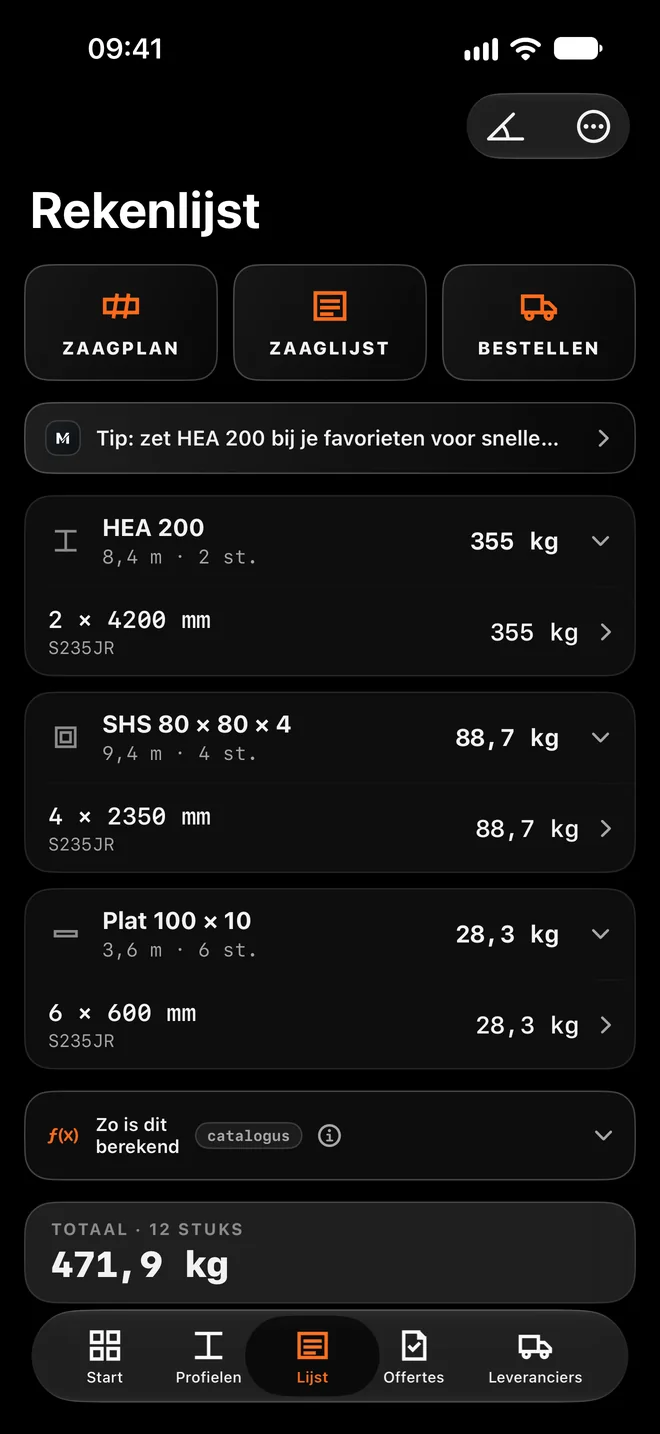
Takeoff list: weight per section and the total. -
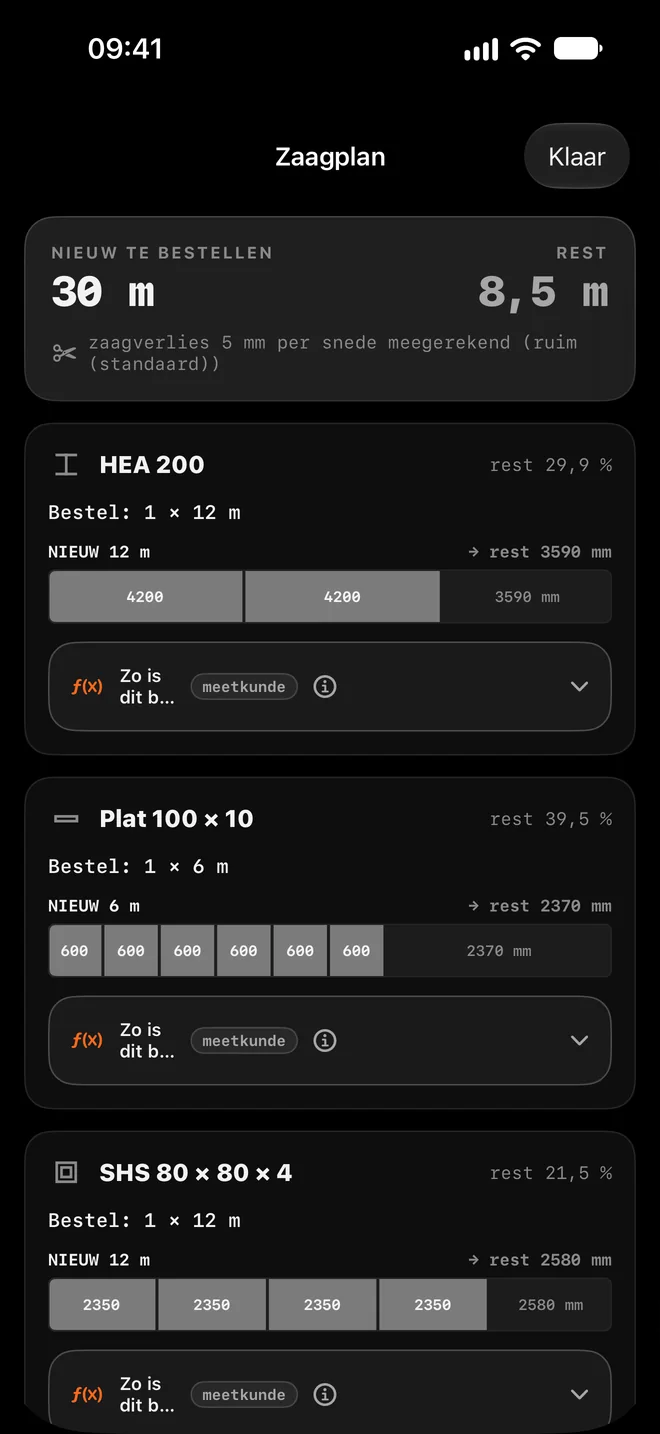
Cutting plan: what to order and what is left over. -
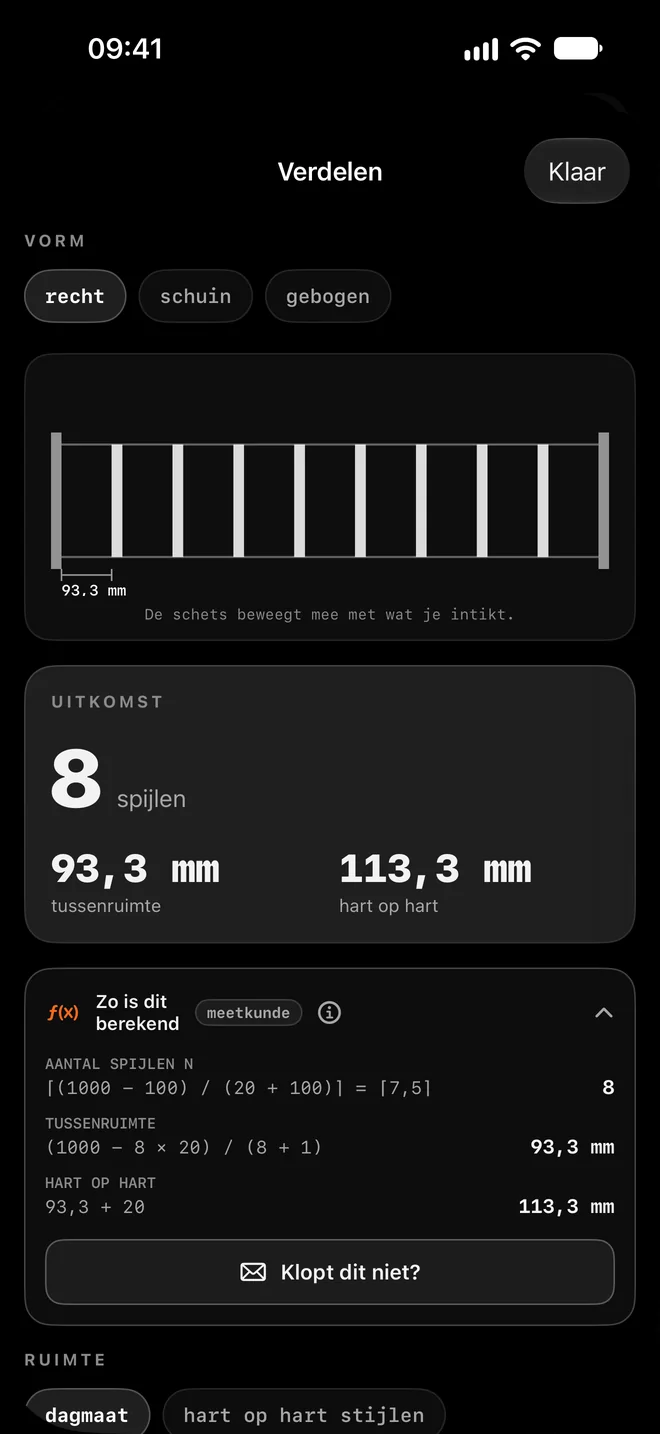
Spacing, with the working shown.
From sketch to cutting file
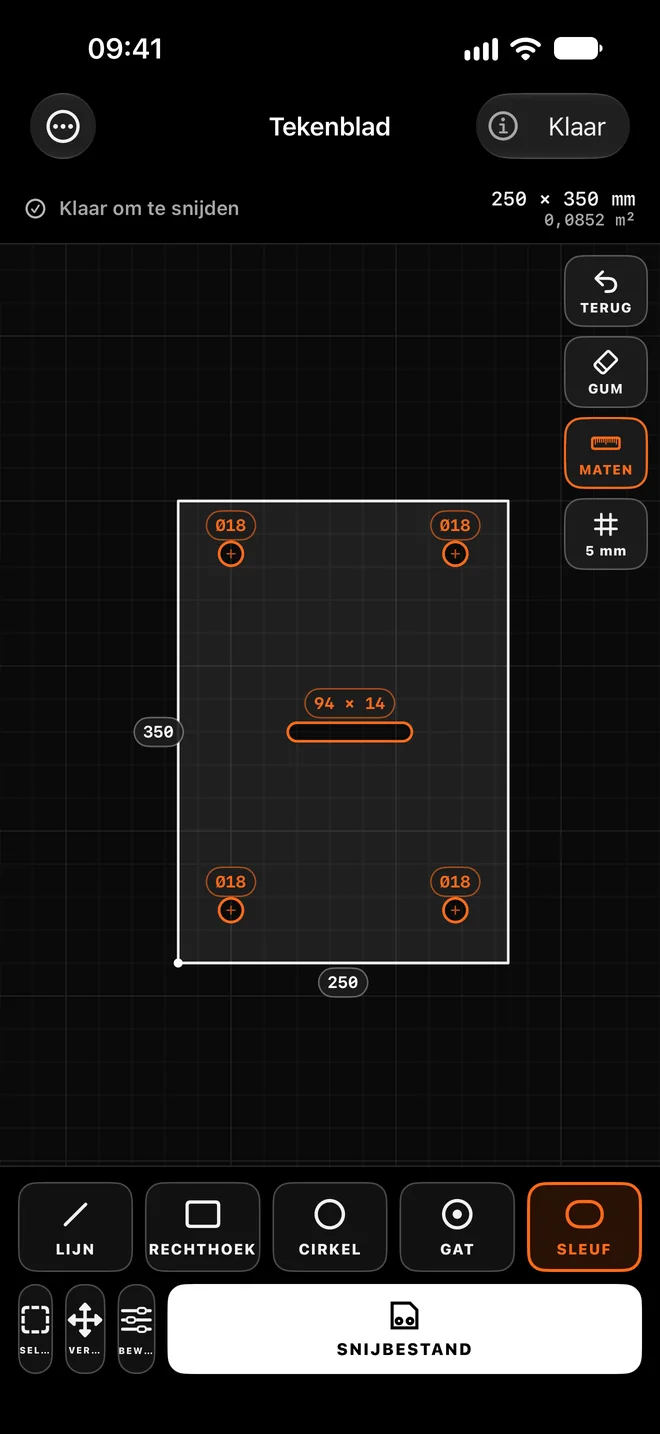
Draw your plate with your finger or type the dimensions. MasMetal straightens it out and turns it into a DXF for laser, plasma or waterjet.
Plate → DXF
Rectangle, disc or flange, with holes, slots, rounded corners and chamfers.
Scriber
Draw with your finger. Grid, snapping, auto-straighten and CAD edits.
Request a price
Email the DXF to your own cutting shop, or get an online price from 247TailorSteel or OrderOn.
Numbers you can trust
If you buy steel on a number, it has to be right. So MasMetal shows where every number comes from.
How this was calculated
Every calculator card shows the working, with your own numbers.
Standards
Section data per AISC, ASTM A6, EN 10365, EN 10056-1 and EN 10210/10219.
Something wrong?
One button, and we check it.
Coming next
MasMetal grows with the shop. This is planned after launch.
Soon
-
In the workshop
Cutting plan 2.0
Buying advice per supplier: which stock lengths to order.
-
In the workshop
Flat patterns and rolling
Bend lines in Plate → DXF and the flat pattern as DXF, for rolled parts too.
-
In the workshop
Sketch → Scriber
Photograph a sketch with dimensions and it opens as a drawing in Scriber.
Later
-
On the drawing board
3D
Frames from sections and plates with thickness in 3D, with cut list and weight.
-
On the drawing board
Job notes
Photo, dimension and note per job, kept with your project.
-
On the drawing board
Quotes and invoices
From calculation list to quote and invoice, with e-invoicing via Peppol.
Free and Pro
Pro changes nothing about the free tools: they stay exactly as they are. Pro adds drawing and DXF files, plus monthly credits for AI scans.
| Feature | Free€0 / $0, for good | Pro€9.99 / $9.99 a month |
|---|---|---|
| Calculate | ||
| Sections and library | ||
| Calculation list and weight | ||
| Cutting plan and offcuts | ||
| Mitre, Spacing and Pipe joint | ||
| Sheet metal bending | ||
| Working and standards | ||
| Quote requests and orders by email | ||
| Drawing and DXF | ||
| Plate → DXF | ||
| Scriber | ||
| 3D | In development | |
| Flat patterns and rolling | In development | |
| AI | ||
| Scan of drawings and delivery notes | 3 a month | Monthly credits |
| Sketch → Scriber | In development | |
| Always | ||
| No ads | ||
| Account | Not needed | For your subscription |
| Your data stays on your iPhone | ||
| 7-day free trial | ||
PRO €9.99 / $9.99 a month, or €79 / $79 a year. Arrives after launch, with a 7-day free trial. Free stays free.
Missing something?
MasMetal is built with the shop floor. Your idea could be the next tool.