Guides / Pro
Plate → DXF
PROType in a plate with holes and send it to the laser as a DXF.
What it is for
Base plates, end plates, flanges and discs: you type the sizes and the app makes a DXF that laser, plasma and waterjet can handle. With weight and cut length.
Where to find it
Calculator → Plate → DXF.
Step by step
Pick the shape
Under SHAPE: rectangle, chamfered, rounded, disc or ring.
Give the sizes
Width and height (or diameter), the thickness and the number of pieces.
Place the holes
Under HOLES: a round hole, slot or cut-out. Or use a pattern: "Place 4 holes" for a base plate, or a bolt circle for a flange.
Check the result
If it says "Ready to cut", all is well. Fix red points first; orange points are warnings, such as a hole closer to the edge than the plate thickness.
Send it off
Under CUTTING FILE: SHARE, EMAIL to your supplier, or ONLINE QUOTE at 247TailorSteel or OrderOn. SAVE keeps the plate with a project.
Worked example: Base plate 200 × 200
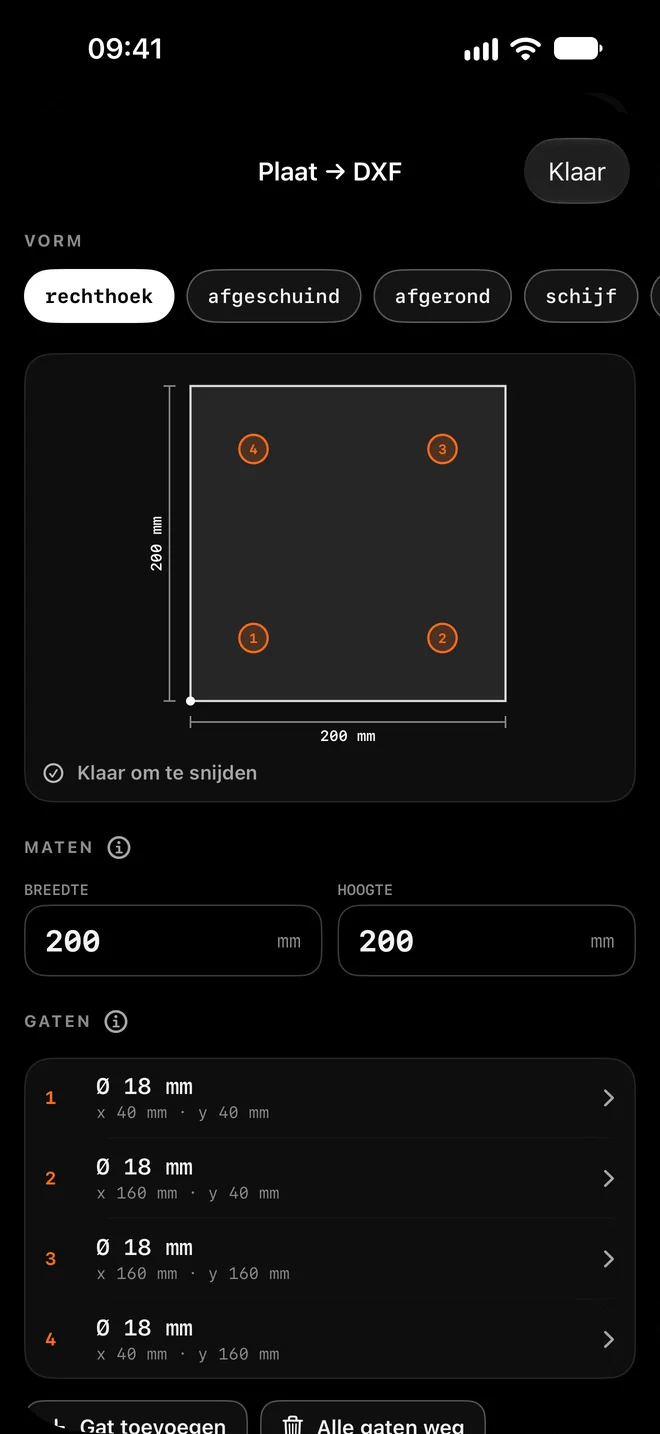
Rectangle 200 × 200 mm with four Ø 18 mm holes, each 40 mm from the edge.
| Hole | x from left | y from bottom |
|---|---|---|
| 1 · Ø 18 | 40 mm | 40 mm |
| 2 · Ø 18 | 160 mm | 40 mm |
| 3 · Ø 18 | 160 mm | 160 mm |
| 4 · Ø 18 | 40 mm | 160 mm |
How the app calculates
- Each hole is placed by its centre, measured from the bottom-left corner of the plate.
- Cut length per piece = outline 4 × 200 + 4 holes × π × 18 ≈ 1026 mm.
Tips for the best result
- The DXF is R12 in mm, with the outline on layer CONTOUR and the holes on layer GATEN. Arcs and circles stay real arcs.
- The file has no dimensions or title block: the laser only reads the lines.
- A hole smaller than the plate thickness is hard for many lasers. The app warns you.
- Draw a free shape in Scriber.
Questions
Where is the origin?
Bottom left. For a disc or ring it is the bottom-left corner of the square around it.